
There are two methods to delete an Independent Action Group (IAG).
Drag all actions, one at a time, and drop them anyplace outside of the IAG. Once all actions have been moved out of the group, the group will be deleted.
Hover over any action in the group, and click on the Delete IAG icon (the trash can on the left with a border matching the IAG border).
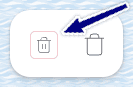
Clicking on the trash can on the right will delete the action.